

Apple Finally Made a Touchscreen Mac, and It Starts at $2,899
Apple's first touchscreen Mac is a MacBook Pro with a tandem OLED display, Dynamic Island and M5 Pro or M5 Max, from $2,899. Here is who should buy it.

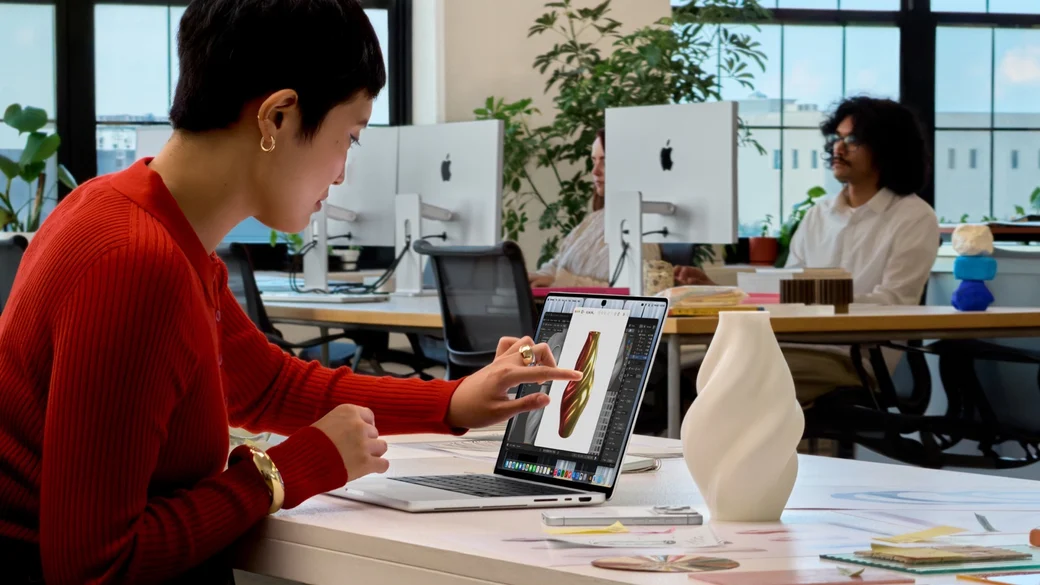
After years of saying no to touch on the Mac, Apple has finally said yes.
At its "Pro and Tell" event on October 28, 2026, Apple unveiled the MacBook Pro with PROLED XDR Display, its first Mac with a touchscreen. It is not a small experiment either. It is a new high end MacBook Pro in 14-inch and 16-inch models, with a tandem OLED display, a Dynamic Island instead of a notch, and a thinner and lighter design.
Preorders started October 28, with availability beginning Friday, November 6.
The display: PROLED XDR, and yes, you can touch it
The headline is the display itself. PROLED XDR uses tandem OLED technology, with two self-illuminating pixel layers, plus a display engine that controls the color and luminance of every pixel in real time.
Apple's claimed display specs are:
- Up to 2,000 nits peak HDR and SDR brightness
- Up to 1,000 nits sustained full-screen brightness
- 10,000,000:1 contrast ratio
- ProMotion adaptive refresh rate from 10Hz to 120Hz
- P3 and Adobe RGB color gamuts in a single default preset, with more than 80 percent Rec. 2020 coverage for HDR video
- Nano-texture option, etched into the cover glass, for reduced glare
For color critical work, Apple also adds factory calibration, reference modes for cinematic, photography, print, and design standards, DICOM medical imaging reference modes for nondiagnostic reviews and research, and Apple Color Matching Function 2026 for consistent color when paired with iPhone 18 Pro or Studio Display XDR.
The actual screen sizes are slightly larger than the names suggest, thanks to slimmer bezels: 14.2 inches for the 14-inch model and 16.3 inches for the 16-inch model.
Touch is built into the panel itself, not layered on top of it, which Apple says reduces latency so it feels like you are touching the content directly. The touch sensor does not replace the keyboard and trackpad. It works alongside them.
Everyday touch gestures include:
- Swipe to scroll through a webpage
- Pinch to zoom in on a photo, document, or webpage
- Drag and drop slides from one presentation to another
- Double-tap a window to fill the screen, or flick to tile it into place
- Draw and annotate directly onscreen
For pros, Apple pitches touch as a workflow tool, not a gimmick. Graphic designers can use the entire display as a canvas instead of being limited to the trackpad area. Musicians can play software instruments onscreen. Developers can test how Touch performs in their iOS and iPadOS apps directly on the MacBook Pro display.
Apple says macOS automatically translates touches into clicks, so many existing apps should work with Touch right away. Apple apps are optimized for Touch, and Apple lists third-party apps including Notion, Canva, Zoom, Microsoft Word, Excel, PowerPoint, Outlook, Adobe Lightroom, DaVinci Resolve, Blender, Maxon Cinema 4D, Maxon ZBrush, Shapr3D, and Algoriddim djay Pro, though Apple's footnote notes that some of the listed apps will be available later this year, so not every Touch optimized app will be ready on day one.
Two hardware details support touch in practice. A redesigned hinge provides greater stability while using Touch, so the screen does not wobble every time you tap it. And advanced video stabilization automatically smooths the camera feed in real time while using Touch on a video call, so tapping the screen does not shake your picture.
Dynamic Island comes to the Mac
The notch is gone. In its place is a Dynamic Island, just like on iPhone, serving as the home for Spotlight, Live Activities, and Siri AI.
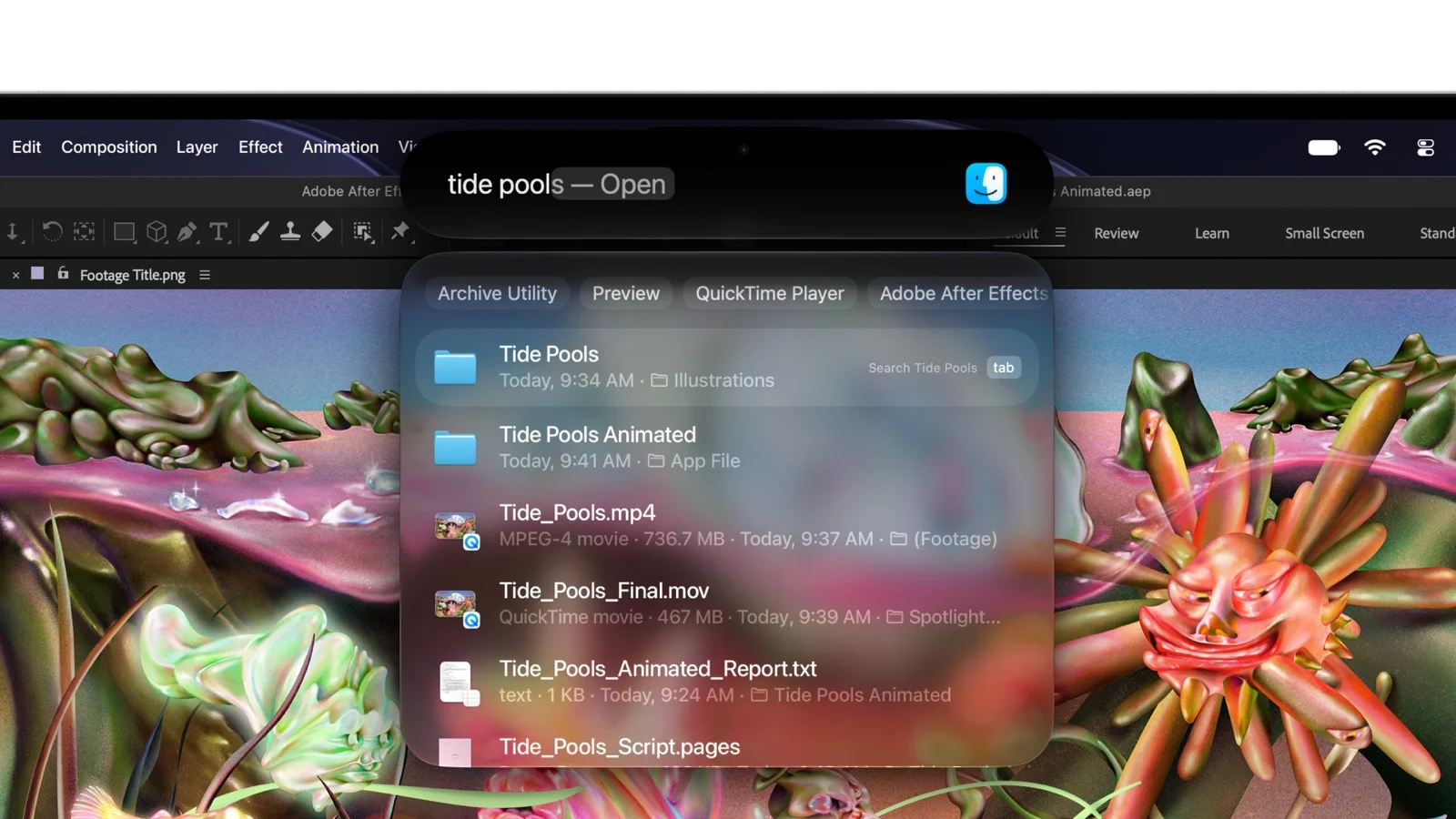
You can search for anything on your Mac, see real-time updates at a glance, ask Siri AI a question, pick up a phone call, control music, accept an AirDrop request, or pause a song with a tap. Spotlight only moves to the Dynamic Island if Siri AI is available and enabled.
It is a small change visually, but it signals how Apple is thinking about this Mac: less like a traditional laptop with a camera cutout, and more like a device that borrows the best interaction ideas from iPhone and iPad.
One thing the Dynamic Island does not bring is Face ID. On iPhone, the Dynamic Island wraps around the TrueDepth camera that powers Face ID, but here it surrounds a 12MP Center Stage camera. You still unlock this MacBook Pro with Touch ID on the keyboard, so there is still no Mac with Face ID.
Thinner, lighter, and still up to 24 hours of battery
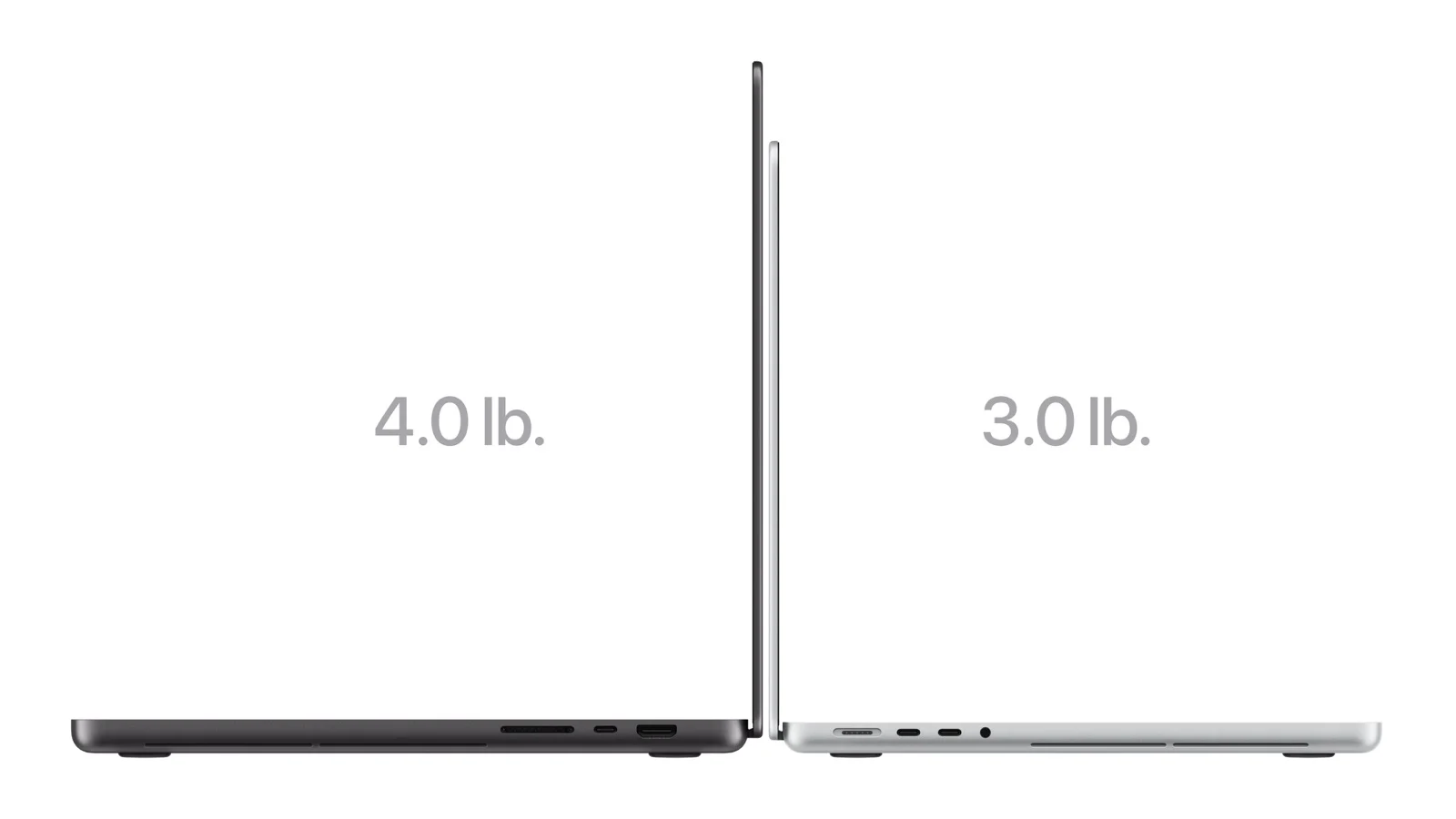
Despite the new display and touch layer, the new MacBook Pro is thinner and lighter than before:
- 14-inch model: 3 pounds, half a pound less than before, and half a millimeter thinner
- 16-inch model: 4 pounds, 0.7 pounds less than before, and nearly a millimeter thinner
Apple claims up to 24 hours of battery life, the same headline figure as the M6 entry level model, with the same performance whether plugged in or on battery. Real battery life will vary by use and configuration, but the combination of a lighter machine and a full day claim is notable for a high end Pro laptop.
A redesigned thermal architecture directs warm air away from the display, which Apple says enables the same sustained performance from M5 Pro and M5 Max even in the lighter design.
M5 Pro and M5 Max, not M6
Here is the chip detail that will confuse people if they are not paying attention. The touchscreen MacBook Pro does not use M6. It uses M5 Pro and M5 Max, the same chips Apple put in its MacBook Pro models in March.
That is a tier versus generation tradeoff. M6, in the $1,999 entry level 14-inch model announced October 27, is newer, but it is a base chip. M5 Pro and M5 Max are higher tier chips, with more GPU power, more memory bandwidth, and support for much larger memory and storage configurations:
- Up to 128GB of unified memory
- Up to 16TB of storage
- Support for up to three external displays with M5 Pro, and up to four with M5 Max
M5 Max is built for users who want to push further, including 3D VFX artists, AI developers, and film composers, with the ability to run large language models with hundreds of billions of parameters entirely on device, according to Apple.
Other pro features include three Thunderbolt 5 ports, HDMI, SDXC card slot, MagSafe, headphone jack, Wi-Fi 7 and Bluetooth 6 via Apple's N1 wireless chip, Touch ID, fast charging to 50 percent in 30 minutes, a 12MP Center Stage camera, studio quality mics, and a six-speaker sound system with an all-new woofer design for 50 percent deeper bass. For the first time, Apple also adds dedicated audio tuning for closed-lid use, so the MacBook Pro sounds good when connected to an external display with the lid closed.
It ships with macOS 27 Golden Gate, including Siri AI, Apple Intelligence features across apps, and Touch built for macOS 27.
Price and availability
US pricing for the MacBook Pro with PROLED XDR Display:
- 14-inch with M5 Pro: $2,899, or $2,749 with education savings
- 16-inch with M5 Pro: $3,399, or $3,199 with education savings
- 14-inch with M5 Max: $4,499, or $4,199 with education savings
- 16-inch with M5 Max: $4,799, or $4,499 with education savings
Apple Upgrade leasing starts at $55.99 per month for a 36-month lease in the US, excluding taxes and any trade-in credit.
Preorders started October 28 in 30 countries and regions, including the US. It begins arriving to customers and in Apple Store locations and Apple Authorized Resellers on November 6.
It comes in space black and silver.
Touchscreen Pro versus M6 MacBook Pro: which one should you buy?
This is now a real choice, and Apple is selling both models side by side. Here is the quick comparison:
Touchscreen PROLED Pro | M6 14-inch Pro | |
|---|---|---|
Starting price | $2,899 | $1,999 |
Sizes | 14.2-inch and 16.3-inch | 14-inch |
Display | Tandem OLED, touch, 2,000 nits, 10,000,000:1 contrast, ProMotion 10 to 120Hz | Liquid Retina XDR, 1,600 nits peak HDR, 1,000,000:1 contrast |
Chip | M5 Pro or M5 Max | M6 |
Max memory | 128GB | 32GB |
Max storage | 16TB | 4TB |
Ports | Three Thunderbolt 5 | Three Thunderbolt 4 |
External displays | Up to 3 (M5 Pro) or 4 (M5 Max) | Up to 2 |
Battery | Up to 24 hours | Up to 24 hours |
The $900 gap between the cheapest touchscreen model ($2,899) and the M6 model ($1,999) is the price of the PROLED display, touch, the higher tier chip, Thunderbolt 5, and the larger memory and storage ceilings.
Who should buy the touchscreen Pro
- Photographers, colorists, and video editors: The PROLED display, with P3 and Adobe RGB, factory calibration, and reference modes, is the closest thing to a portable reference display Apple has ever sold in a laptop.
- Designers, 3D artists, and musicians: If you draw, model, or play instruments, touch on a 14-inch or 16-inch canvas is a genuine workflow change, not just a way to scroll webpages.
- Power users who need 128GB of memory or 16TB of storage: The M6 model cannot match those ceilings.
- Anyone who travels with a Pro laptop: At 3 pounds for the 14-inch model, this is now lighter than many non touch Pro laptops used to be.
Who should not buy it, at least not yet
- M6 MacBook Pro buyers on a budget: If you just need a fast, modern MacBook Pro, the $1,999 M6 model saves $900 and gives you a newer base chip, with the same 24-hour battery claim.
- People who mainly use a keyboard and trackpad: Touch is additive, not required. If you never touch your laptop screen now, you may not touch this one much either, and you would be paying a premium for a display feature you do not use.
- Anyone waiting for M6 Pro or M6 Max: Those chips are not in this model. If you want the newest Pro tier silicon, you will need to wait for a future update, and Apple has not announced one.
Bottom line
Apple resisted touch on the Mac for more than a decade, arguing that macOS was not built for it. With the MacBook Pro with PROLED XDR Display, Apple is finally admitting that touch can live alongside a keyboard and trackpad, especially for creative pros.
The display alone would make this a notable MacBook Pro: tandem OLED, 2,000 nits, 10,000,000:1 contrast, P3 and Adobe RGB, and ProMotion. Touch, Dynamic Island, a lighter design, and M5 Pro and M5 Max performance make it a flagship.
The price is the catch. At $2,899 to $4,799, this is a professional tool with a professional price. For most people, the $1,999 M6 MacBook Pro is the smarter buy. For pros who live in color critical work, or who have been waiting for a Mac they can actually touch, this is the MacBook Pro they have been asking for.
Preorders are open now, with availability November 6. Just decide first whether you are paying for touch and PROLED, or whether you just want a great MacBook Pro.