

Apple Just Shipped 27.2 Everywhere. Siri AI Finally Gets a Memory, and More Languages
Apple's 27.2 updates give Siri AI a memory of past chats, more personal context and five new languages, plus Apple TV profiles and 1,265 security fixes.


Apple released its 27.2 software updates on Monday, October 26, 2026, across nearly everything it makes: iOS 27.2, iPadOS 27.2, macOS Golden Gate 27.2, watchOS 27.2, tvOS 27.2, visionOS 27.2, and HomePod Software 27.2.
If you are wondering where 27.1 went, you did not miss it. Apple reserved the 27.1 version number for the iPhone Duo launch, so every other platform jumps straight from 27 to 27.2. This is effectively the first major update to the operating systems that launched in September, and it is bigger than a typical point release.
The headline is Siri AI. It can now remember past conversations, draw on more of your personal context, and speak five more languages. The rest of the update is a mix of useful app changes, a few iPhone Duo extras, home audio upgrades, and a large security fix. Here is what matters, platform by platform.
The big change: Siri AI gets a memory
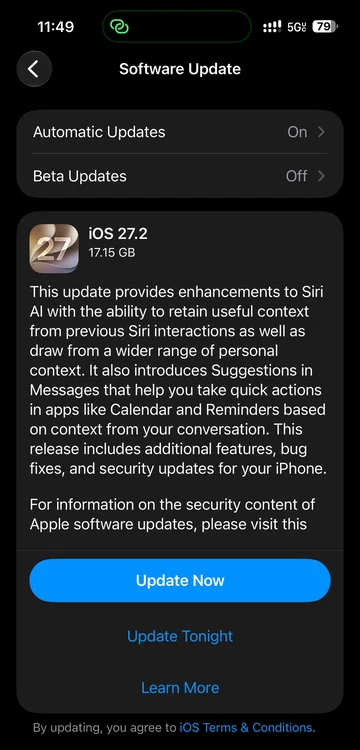
The most important Siri AI change in 27.2 is contextual memory. Siri AI can now recall your past conversations, so you can ask about something it told you before, like a restaurant it recommended last week, instead of starting from scratch every time.
It can also draw from more sources to answer you, including:
- Photos attached in Messages
- Calendar event attendees
- Your voicemails
- Better results from Safari history and Reading List
That makes Siri AI more useful, and also more personal. Apple is trying to balance that with a new Excluded Apps setting, which lets you choose which apps Siri, Search, and suggestions can access, all from one setting. If you do not want Siri pulling from a particular app, you can turn it off there instead of digging through individual settings.
Siri AI also gets granular text selection on iPhone, iPad, and Vision Pro, so you can select and copy just the part of a Siri response you need, rather than the whole answer. The Mac has always allowed this.
Language support expands from English only to include French, Japanese, Korean, Portuguese, and Spanish. Apple has said Chinese (traditional), Norwegian, Turkish, and Vietnamese are due by the end of the year.
There are still limits. Siri AI requires an iPhone 15 Pro or later, or any iPhone 16 model and later, and it is not available to users under 13. Some features that rely on server side models have daily usage limits, and Apple has said expanded access will be available for a fee in the future.
Regional availability is uneven, and this is where you need to read the fine print. Siri AI is not available in the EU or mainland China on iPhone, iPad, and Apple Watch. On Mac and Vision Pro, the situation is different: Siri AI has been limited to those platforms in the EU since the launch of the 27 generation, but only when the system is set to a supported language. German and Italian are still missing from the new language list, so this update helps French and Spanish speakers in the EU on Mac, but it does not open Siri AI to everyone there.
iOS 27.2 and iPadOS 27.2: the core update
iOS 27.2 is available for all iPhones that can run iOS 27, including the iPhone Duo. iPadOS 27.2 is available for all iPads that can run iPadOS 27, including the newly announced OLED iPad mini.
Beyond Siri AI, the main app changes are:
Messages Suggestions: Messages can now suggest actions based on the context of a conversation, like adding a dinner invite to Calendar or a task to Reminders. You can choose which suggestion types you want, with options for Calendar, Reminders, Notes, Maps, and Flights and Packages. This feature was in the iOS 27 beta, then removed before launch, and now it is back.
Apple TV profiles: The Apple TV app now supports Simple Profiles, so everyone in a household can have their own profile, with recommendations that fit what they like to watch.
Apple Music and Podcasts: Apple Music gets a new black and white icon inspired by a soundwave, part of a wider rebrand that replaces the old red highlights with blue in places. The Podcasts app Home tab now has separate sections for New Episodes and Continue Playing.
Photos and Image Playground: Photos and Image Playground can now detect SynthID, Google's invisible watermark that helps identify whether an image was generated or modified with generative AI tools.
Shared Albums: Shared Albums in Photos adds the ability to edit captions and comments, avoid adding duplicate photos, and display a reminder before albums expire so participants can save important photos and videos.
FaceTime: Dual Capture, which streams the front and rear cameras at the same time, now works in Group FaceTime calls on recent iPhones, including iPhone 17 models, iPhone Air, iPhone 18 Pro models, and Duo. FaceTime also supports adding a third party sign language interpreter or live captioner to a call.
EU privacy prompt: In the EU, the update introduces an alternative, expanded prompt for App Tracking Transparency.
iPhone Duo extras
iPhone Duo owners get two specific additions in this cycle:
- Apple Pencil (USB-C) support: The Duo now works with Apple Pencil (USB-C). Other Apple Pencil models are not supported, including Pencil Pro, which is a notable gap given the Duo's notebook like folding screen.
- Edge Light: Edge Light frames the Duo's screen in a faux ring light, illuminating your face when you are on a video call or filming yourself with the front camera.
iPad only extras
iPadOS 27.2 makes side by side multitasking easier. When you tile an app to the left or right with the window controls or the menu bar, iPadOS now lets you pick a second app to fill the other half.
Write with Siri is also easier to reach on iPad. It now appears when you hover over a text selection or an empty line with a trackpad, and when you select handwritten text in Notes, giving quick access to Siri AI and writing tools like proofreading and rewriting without leaving the current app.
On the new iPad mini, iPadOS 27.2 also enables extended display mode when connected to an external display, so you can move windowed apps across the iPad and an external screen instead of just mirroring the same content.
macOS Golden Gate 27.2: same Siri AI, plus small Mac changes
macOS Golden Gate 27.2 is the first major update to macOS 27, which launched in September. It carries the same Siri AI improvements: conversation memory, wider personal context, Excluded Apps, and the five new languages. In Mail, Write with Siri now appears in the formatting bar when you compose a message.
It also brings Messages Suggestions, so you can create a Calendar event or Reminder directly from a chat, and the same Shared Albums, SynthID, and FaceTime accessibility improvements as iOS.
The most visible Mac specific change is smaller: Apple has reworked the brightness and volume sliders. When you adjust them with the keyboard, they now move in small, visible steps instead of gliding smoothly. Control Center sliders keep their old look.
Under the surface, beta testers also spotted early touch related tools in apps like Safari and Photos, which Apple itself has not highlighted. That fits with expectations for a touchscreen MacBook Pro, expected to be unveiled later this week, and macOS 27.2 is likely to be the version new Macs ship with. Treat the touch tools as preparation, not as a feature you can use on a current Mac.
watchOS 27.2: Siri AI on your wrist, faster
watchOS 27.2 is largely focused on Siri AI. It brings the same conversation memory, wider personal context from your paired iPhone (including Messages photos, Calendar attendees, voicemails, and Safari history and Reading List), Excluded Apps control on your phone, and the five new languages.
Apple also says Siri AI now provides faster responses on Apple Watch. The watch update also brings the new black and white Apple Music icon and smaller design updates in the Music app.
To install it, update your iPhone to iOS 27.2 first, then update the watch through the Watch app or the watch's Software Update settings. The watch needs to be on its charger with more than 50 percent battery.
Siri AI on the watch depends on the paired iPhone. It works on Apple Watch Series 9 and later, Apple Watch Ultra 2 and later, and Apple Watch SE 3, when paired with an iPhone that supports Apple Intelligence and Siri AI.
tvOS 27.2 and HomePod: the living room update
tvOS 27.2 is the first major update to tvOS 27, and it runs on the Apple TV 4K (second generation) and later. Its biggest feature is four speaker surround sound, but with an important hardware limit.
With the fourth generation Apple TV 4K, you can use four compatible HomePods as two front and two rear speakers: four HomePod mini 2 speakers, four second generation HomePods, or two HomePods and two HomePod mini 2 speakers, as long as each pair matches. The original HomePod and original HomePod mini cannot be used for surround sound, and older Apple TV models do not support the feature. The HomePod mini 2 launches October 30, and the fourth generation Apple TV 4K comes out November 13, so many people will get the software before they can use this feature.
The rest of tvOS 27.2 is a handful of smaller conveniences. You can join FaceTime calls on Apple TV from a FaceTime link, add a sign language interpreter or live captioner to a call, pick specific photos for the screen saver from your iPhone without sharing your whole library, and shuffle between screen saver categories. The Siri Remote (second generation) and later now show up in Find My, too. Siri AI is not part of this release on Apple TV.
HomePod Software 27.2 adds a Sound Glow visualizer on HomePod mini, HomePod mini 2, and the second generation HomePod, lets you set HomePod as the audio output for everything on your Mac with a persistent AirPlay connection, and adds lock controls to disable the touch controls on top of HomePod to prevent accidental taps from pausing music, skipping songs, or changing volume.
visionOS 27.2: a small update for Vision Pro
visionOS 27.2 is a smaller update. It adds Excluded Apps, granular text selection for Siri responses, SynthID support in Photos and Image Playground, and FaceTime support for a third party sign language interpreter or live captioner. Siri AI's new conversation memory and wider personal context are not part of the Vision Pro update.
Siri AI language support expands on Vision Pro as well, with Apple's visionOS release notes listing French, Japanese, Korean, and Spanish (Portuguese is not listed in that platform's notes, even though it is included on iPhone, iPad, Mac, and Watch). As with the other platforms, Siri AI is not available in mainland China.
There are no major Vision Pro specific features in this release, which is consistent with Vision Pro getting fewer headline updates than iPhone and Mac in this cycle.
Security: the reason not to delay
Beyond features, 27.2 is a major security update. Across all of the October 26 releases, Apple's security notes list 1,265 fixes in total, counting each platform separately because many flaws affect more than one operating system. iOS 27.2 alone fixes 163 vulnerabilities, and macOS Golden Gate 27.2 fixes 263, a record for a single Mac update.
If you cannot run version 27, Apple also issued security updates on older branches, including iOS 26.7.2 and iPadOS 26.7.2, and iOS 18.7.11 and iPadOS 18.7.11 for even older devices, plus macOS Tahoe 26.7.2 and macOS Sequoia 15.8.2 for Macs not running macOS 27, along with Safari 27.2 for Tahoe and Sequoia. The iOS 18.7.11 update includes a fix for a vulnerability that was already being exploited, so install it right away if you are on an older iPhone.
What did not ship
One notable absence: the redesigned Health app that appeared in beta testing was removed before the final 27.2 build and deferred to a later point release. If you were waiting for that, you will need to wait a little longer.
How to update
To update, go to Settings, then General, then Software Update on iPhone, iPad, Apple TV, and Vision Pro. On Mac, go to System Settings, then General, then Software Update. On Apple Watch, update your iPhone first, then use the Watch app or the watch's Software Update settings while it is charging.
Bottom line
27.2 is not a flashy redesign, but it is the update that makes Siri AI feel less like a demo and more like an assistant: it remembers what it told you, it can pull from more of your life, and it now speaks French, Japanese, Korean, Portuguese, and Spanish.
The rest is practical: Messages that suggest the next step, Apple TV profiles for the household, four HomePod surround sound for the new Apple TV 4K, Pencil support for the Duo, and a large security fix across every platform.
If you use Siri AI, update for the memory and languages. If you do not, update for the security fixes anyway. Just check the language and device limits first, especially if you are in the EU, so you know exactly which parts of Siri AI you will actually get.